AI Writing Tools: What They Are and 12 Examples to Know in 2026
supawriter
AI writing tools are software applications that use generative AI to help you brainstorm, draft, rewrite, edit, and optimize text. If you publish content regularly, they can cut hours of work down to minutes, but only when you use clear inputs, review the output, and pick the right tool for the job. Getting consistent, on-brand long-form output is much easier with Supawriter, especially if you also need built-in SEO support and publishing workflows.
What are AI writing tools? (simple definition)
AI writing tools are AI-powered apps that help with writing, usually by generating text from a prompt and improving existing writing through rewrites, summaries, tone changes, and grammar fixes. Scribbr describes them as AI applications (like ChatGPT) that automate or assist writing by generating text from prompts. Scribbr's definition is a good baseline.
AI writing tools vs. AI chatbots
An AI chatbot is usually general-purpose, you ask questions and it responds. An AI writing tool is often built for specific writing outcomes like:
- producing a blog post draft in a defined structure
- rewriting paragraphs in a specific tone
- generating SEO elements like titles and meta descriptions
- managing a workflow (briefs, approvals, publishing)
Some products do both, but the difference shows up when you need repeatable output. A chatbot can be great for ideation, while a writing tool is what you use when you want a reliable path from brief to publish.
What counts as an AI writing tool in 2026
In 2026, "AI writing tools" includes more than text generators. You'll commonly see:
- Drafting tools (short-form and long-form)
- Editors and rewriters (clarity, tone, concision)
- Grammar and style assistants
- Research helpers (summaries, Q&A over sources)
- SEO-focused content systems (keyword targeting, internal linking suggestions)
- Publishing systems (scheduling, CMS workflows, performance feedback)
Coursera frames AI writing tools as applications that can help with brainstorming, outlining, editing, and generating drafts across the writing process. That end-to-end view matches what most teams need.
What they are not (limits and misconceptions)
AI writing tools are not:
- guaranteed fact machines (you still need verification)
- automatic thought leadership (you still need your perspective)
- safe to use with any sensitive data by default (privacy varies by vendor)
- a substitute for editorial standards (quality control matters more, not less)
Once you accept those constraints, you can use AI writing tools to scale quality, not just quantity.
How AI writing tools work (in plain English)
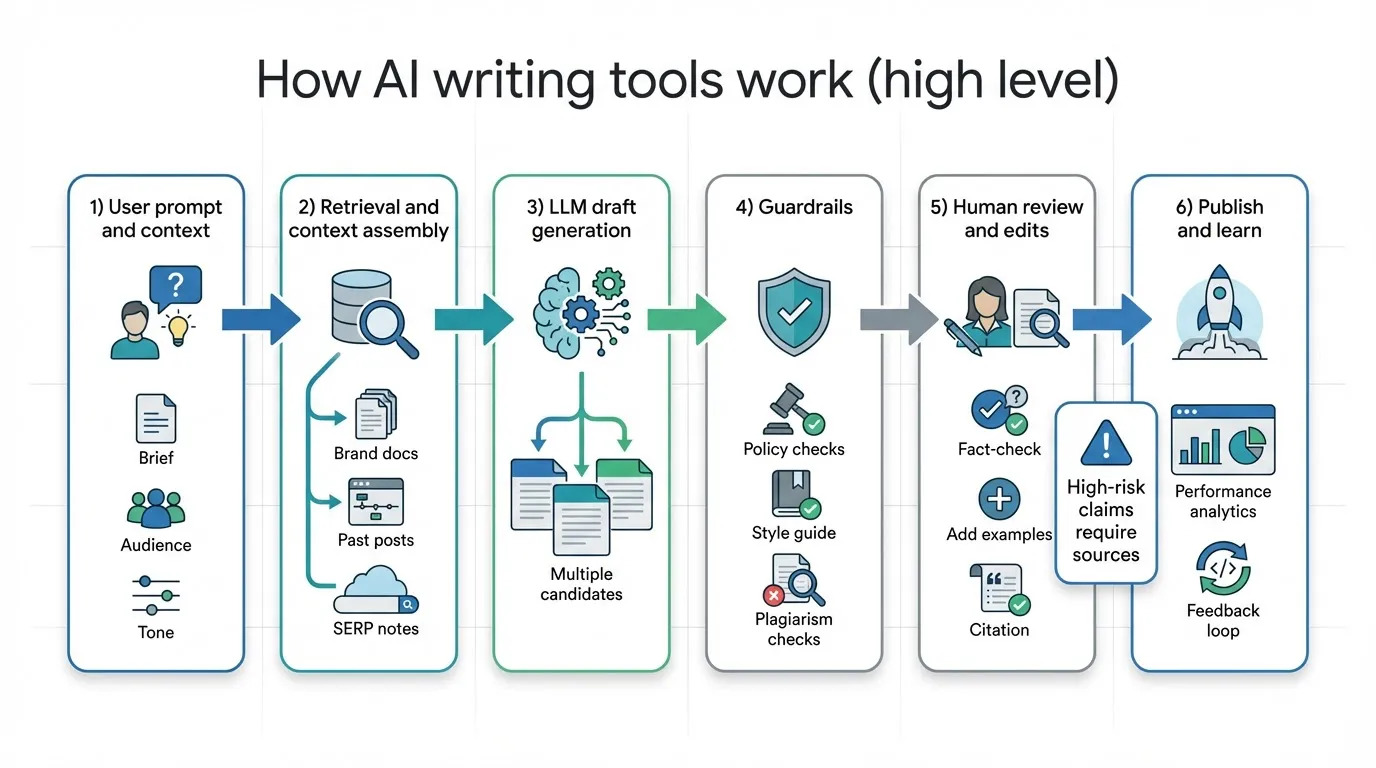
Most AI writing tools are built on large language models (LLMs). They predict the next likely words based on your instructions and the context you provide.
The core building blocks (LLMs, prompts, context)
In practical terms, an AI writing tool combines:
- Your input: topic, audience, angle, and constraints (length, voice, format)
- Context: brand guidelines, product details, prior posts, or sources you supply
- A model: the underlying generative AI that produces text
- A wrapper: product features that turn model output into usable writing workflows
For production content, the wrapper often matters more than the model. Supawriter is built around that idea, it helps you go from keyword to publish-ready long-form content with SEO optimization, internal linking support, scheduling, and a CMS workflow.
Why outputs vary (data, temperature, context windows)
The same prompt can produce different drafts. Outputs depend on things like:
- how specific your prompt is
- how much relevant context the tool can see at once
- randomness settings (often called temperature)
- what brand or document context the tool is allowed to use
If you want consistent results, you need a consistent brief and a consistent review process.
Where mistakes come from (hallucinations, bias, stale info)
Common failure modes include:
- Hallucinations: confident-sounding but incorrect claims
- Stale info: inaccurate "latest" details when the model isn't browsing current sources
- Source confusion: mixing concepts or attributing facts incorrectly
- Over-generalization: bland copy that doesn't match your product reality
The fix usually isn't to avoid AI. Build guardrails instead: require sources for claims, add human review, and use tools that support fact-checking.
What AI writing tools can help you do (use cases)
AI writing tools can support almost any writing workflow, but they work best when you use them for specific jobs instead of asking for a perfect final draft in one shot.
Marketing and SEO content
For marketing teams, AI writing tools are commonly used to:
- find angles and outlines for a keyword
- draft sections quickly (and then edit for expertise)
- create variants for different channels
- generate meta titles, descriptions, and on-page SEO elements
- refresh existing content by adding missing subtopics
If your goal is to publish consistently, the operational parts matter as much as the writing. Supawriter lets teams plan an SEO-driven calendar, draft long-form posts (2,500+ words), and manage publishing from one place.
Business writing and internal docs
AI writing tools are also useful for:
- email drafts and replies
- project updates and meeting summaries
- SOPs and onboarding docs
- customer support macros
- sales enablement drafts
The value here is speed plus consistency: you set a tone, reuse patterns, and spend less time staring at a blank page.
Student and research workflows (with integrity)
In academic settings, AI can still help when you use it transparently and within your institution's rules.
Good assistive uses often include:
- brainstorming topics and research questions
- outlining arguments
- simplifying complex passages
- improving clarity and grammar
UNC's Writing Center encourages responsible use as a learning aid rather than a shortcut, and notes that policies vary by instructor and context. Review their guidance before you rely on AI in coursework.
12 AI writing tools to consider in 2026 (with quick guidance)
Below are 12 commonly discussed AI writing tools in 2026. The goal isn't to pick one winner, it's to help you match a tool to the job.
| Tool | Best for | Strengths you'll notice quickly | Watch-outs |
|---|---|---|---|
| Supawriter | SEO-driven long-form + publishing workflows | Brand voice, SEO optimization, scheduling, CMS workflow | Needs clear inputs and editorial review like any AI |
| ChatGPT | General writing and ideation | Versatile, fast iteration | Output can be generic without strong prompts |
| Claude | Long-form reasoning and drafting | Strong tone and nuance for many users | Requires careful fact-checking |
| Google Gemini | Google ecosystem workflows | Multimodal capabilities | Results vary by setup and context |
| Grammarly | Editing and clarity | Polishing, readability, rewriting | Not a full SEO publishing system |
| Microsoft Copilot | Office-first writing | Works inside common business tools | Governance depends on org setup |
| Jasper | Marketing copy + brand workflows | Brand-oriented features | Can be overkill for small teams |
| Copy.ai | GTM and content variations | Campaign and sales enablement support | Needs strong prompts to stay specific |
| Wordtune | Rewriting and tone | Great for sentence-level improvements | Not a full content engine |
| Sudowrite | Fiction writing support | Creative expansion and story tools | Not built for SEO content |
| Canva Magic Write | Lightweight content for designs | Great for quick drafts in Canva | Not ideal for long-form depth |
| Notion AI | Notes to drafts | Useful where your docs already live | Output quality depends on your notes |
Supawriter
Supawriter is an AI-powered content engine for teams that want rank-ready content without stitching together multiple tools.
It helps you go from a keyword and brief to a publish-ready post, with an integrated CMS and deployment to any website.
Key features:
- long-form AI writing designed for 2,500+ word articles that maintain brand voice
- SEO optimization (keyword targeting, meta tags, on-page structure support)
- smart scheduling and an AI-generated content calendar
- content suggestions for high-opportunity topics
- CMS workflows for drafting, review, publishing, and analytics
Pros:
- best when you care about both writing quality and operational speed
- reduces the handoff friction between brief, draft, optimization, and publishing
- helps teams standardize how AI writing is created and reviewed
Cons:
- like any AI writing tool, it still needs human review for accuracy and differentiation
Best for: SaaS founders and growth teams who want consistent content velocity, SEO structure, and a repeatable process.
Pricing: Varies by plan and usage. If you're evaluating, focus on workflow fit: can it replace multiple tools you're currently juggling?
ChatGPT
ChatGPT is a general-purpose AI assistant used for drafting, ideation, rewrites, and Q&A.
Key features: Conversational drafting, outlining, rewriting, and rapid iteration.
Pros:
- very flexible for brainstorming and first drafts
- strong for prompt-based iteration and tone experiments
Cons:
- easy to get generic content if you don't supply examples and constraints
- you must verify facts and avoid unsupported claims
Best for: Individuals and teams who want a versatile AI writing partner for many task types.
Pricing: Typically includes free and paid tiers depending on access level and features.
Claude
Claude is an AI assistant often used for long-form drafting and editing.
Key features: Long-form writing, summarization, and reasoning-oriented drafting.
Pros:
- good at producing coherent long-form text and maintaining tone
- helpful for restructuring and tightening arguments
Cons:
- still requires careful fact-checking and editorial review
Best for: Writers who want thoughtful drafts and strong rewrites.
Pricing: Usually offered in free and paid tiers.
Google Gemini
Google Gemini is Google's AI assistant with multimodal capabilities.
Key features: Text generation plus the ability to work across certain Google products, depending on your setup.
Pros:
- convenient if your workflow already lives in Google tools
- useful for mixed media tasks in some configurations
Cons:
- outputs can vary depending on context and integrations
Best for: Teams already standardized on Google Workspace.
Pricing: Varies by plan and workspace setup.
Grammarly
Grammarly is an AI-enhanced writing assistant focused on correctness and clarity.
Key features: Grammar, spelling, tone suggestions, rewrites, and paragraph generation in some versions.
Pros:
- excellent for polishing drafts and improving readability
- easy to adopt across a team
Cons:
- not designed to run a full SEO content workflow end to end
Best for: Anyone who needs cleaner business writing and consistent editing support.
Pricing: Offers free and paid tiers.
Microsoft Copilot
Microsoft Copilot is AI assistance embedded in Microsoft's ecosystem.
Key features: Drafting and editing inside common Office workflows.
Pros:
- convenient for organizations already living in Word, Excel, Teams, and Outlook
Cons:
- governance and data handling depend on enterprise configuration
Best for: Enterprise and operations-heavy teams.
Pricing: Depends on Microsoft plan and Copilot add-ons.
Jasper
Jasper is a marketing-focused AI writing platform.
Key features: Marketing templates, brand voice features, and campaign content generation.
Pros:
- purpose-built for marketing content workflows
Cons:
- can be more tool than you need if you only want occasional writing help
Best for: Marketing teams producing lots of campaign copy.
Pricing: Subscription-based with plan tiers.
Copy.ai
Copy.ai is a platform geared toward go-to-market writing and content variations.
Key features: Campaign and sales content generation, repurposing, and workflow templates.
Pros:
- useful for generating multiple variants quickly
Cons:
- needs detailed product context to avoid generic copy
Best for: GTM teams creating multi-channel messaging.
Pricing: Varies by plan.
Wordtune
Wordtune is a rewriting and editing tool.
Key features: Sentence and paragraph rewrites, shortening/expanding, tone adjustments.
Pros:
- strong for improving clarity and flow quickly
Cons:
- not an end-to-end drafting + SEO + publishing system
Best for: Anyone who already has a draft and wants better phrasing.
Pricing: Often includes free and paid tiers.
Sudowrite
Sudowrite is a fiction-oriented AI writing tool.
Key features: Story expansion, description generation, narrative help.
Pros:
- tailored to creative writing workflows
Cons:
- not built for SEO, product marketing, or business writing workflows
Best for: Authors and fiction writers.
Pricing: Subscription-based.
Canva Magic Write
Canva Magic Write is a lightweight AI writing feature inside Canva.
Key features: Quick draft generation for design-adjacent writing (captions, blurbs, basic sections).
Pros:
- fast for social and design workflows
Cons:
- not ideal for deep long-form content with SEO requirements
Best for: Social teams and creators already building in Canva.
Pricing: Tied to Canva plans.
Notion AI
Notion AI is writing assistance inside Notion.
Key features: Summaries, rewrites, turning notes into drafts.
Pros:
- great when your research and notes already live in Notion
Cons:
- quality depends heavily on how structured your notes are
Best for: Teams that use Notion as their documentation hub.
Pricing: Depends on Notion plan and AI add-on.
How to choose the right AI writing tool (and use it responsibly)
Once you understand the categories, choosing gets easier.
A simple evaluation checklist
Use this checklist to compare tools quickly:
- Quality control: Can you enforce tone, structure, and constraints reliably?
- Long-form capability: Does it stay coherent past 1,500 to 2,500 words?
- SEO support: Does it help with keywords, metadata, and on-page structure?
- Workflow: Can multiple people review, approve, and publish?
- Internal linking: Can it help you connect related posts so content compounds?
- Research support: Can you attach sources or verify claims?
- Integrations: Does it fit your CMS and your team's daily tools?
If SEO is the growth lever, you'll usually want a tool that does more than generate text. That's where Supawriter often beats chat-only workflows: it's built around turning drafts into published assets consistently.
Privacy, copyright, and disclosure basics
Before you roll out any AI writing tool across a team, set clear rules:
- Don't paste sensitive customer data unless your legal and security teams approve.
- Treat AI output as a draft, not a source.
- Add citations for claims that need verification.
- Follow your school, employer, or client disclosure requirements.
Coursera also highlights ethical considerations like plagiarism, privacy, and content ownership as part of responsible AI writing tool use. It's worth aligning your process to those risks.
A repeatable workflow that keeps your voice
A simple workflow that works for most teams:
- Write a tight brief: audience, pain point, angle, what to avoid.
- Generate an outline first: approve structure before drafting.
- Draft section by section: keep context focused and reduce drift.
- Add proof: screenshots, examples, and citations for factual claims.
- Edit for voice: add your POV, product specifics, and opinions.
- Optimize for SEO: headings, internal links, metadata, intent match.
- Publish and iterate: update based on rankings and reader feedback.
AI writing tools aren't a novelty in 2026. They're a default for teams that write often. If you want a platform that helps you produce long-form content in your voice, optimize it for SEO, and publish consistently, explore Supawriter and build a process you can stick with.
Grow your traffic on autopilot now
Join thousands of users already using our platform.