Free Keyword Research Tools for 2026: 12 Options You Can Use Today
supawriter

If you’re searching for free keyword research tools, you’re probably trying to do one of two things: find keyword ideas you can rank for, or confirm which keywords are worth writing (or bidding) on.
You can do real keyword research with $0 tools in 2026. The tradeoff is that “free” usually comes with limits, partial data, or numbers that are only good for rough prioritization. That’s why many teams pair a few free tools with a workflow that turns raw keyword lists into publishable pages.
That workflow is easier to run with Supawriter, because it connects research, SEO optimization, and publishing in one place instead of leaving you with scattered spreadsheets.
What “free keyword research tools” really means in 2026
Free vs freemium vs free trial
Most “free” keyword research tools fall into three buckets:
- Free (no cost): You can use core features without paying, but you may hit daily caps.
- Freemium: A permanent free plan exists, but better keyword metrics and bulk exports are paid.
- Free trial: Full access for a short period, then paid.
For SEO, freemium is often enough if you cross-check search demand with more than one source.
Which keyword data you can trust (and what’s directional)
Free tools typically give you one (or more) of these:
- Keyword ideas: related keywords, long-tail variations, and modifiers.
- Volume signals: sometimes exact numbers, often ranges or estimates.
- Competition/CPC: useful as a proxy for commercial intent.
- Trends: whether search demand is rising or falling.
- First-party performance: impressions, clicks, and average position for queries you already rank for.
A good rule is to treat most third-party volume numbers as directional, then validate with another source or your own search performance.
How to pick the right free tool for your job
Pick tools based on what you’re trying to do:
- Brainstorming: autocomplete and question-focused tools.
- Validating: planners and keyword generators with volume signals.
- Prioritizing: tools that help you judge difficulty and intent.
- Operationalizing: a system that turns chosen keywords into briefs, outlines, drafts, and internal links.
If your goal is publishing consistently, you’ll get the biggest lift by pairing a few free tools with a production engine like Supawriter.
How to do keyword research with free tools (a simple workflow)
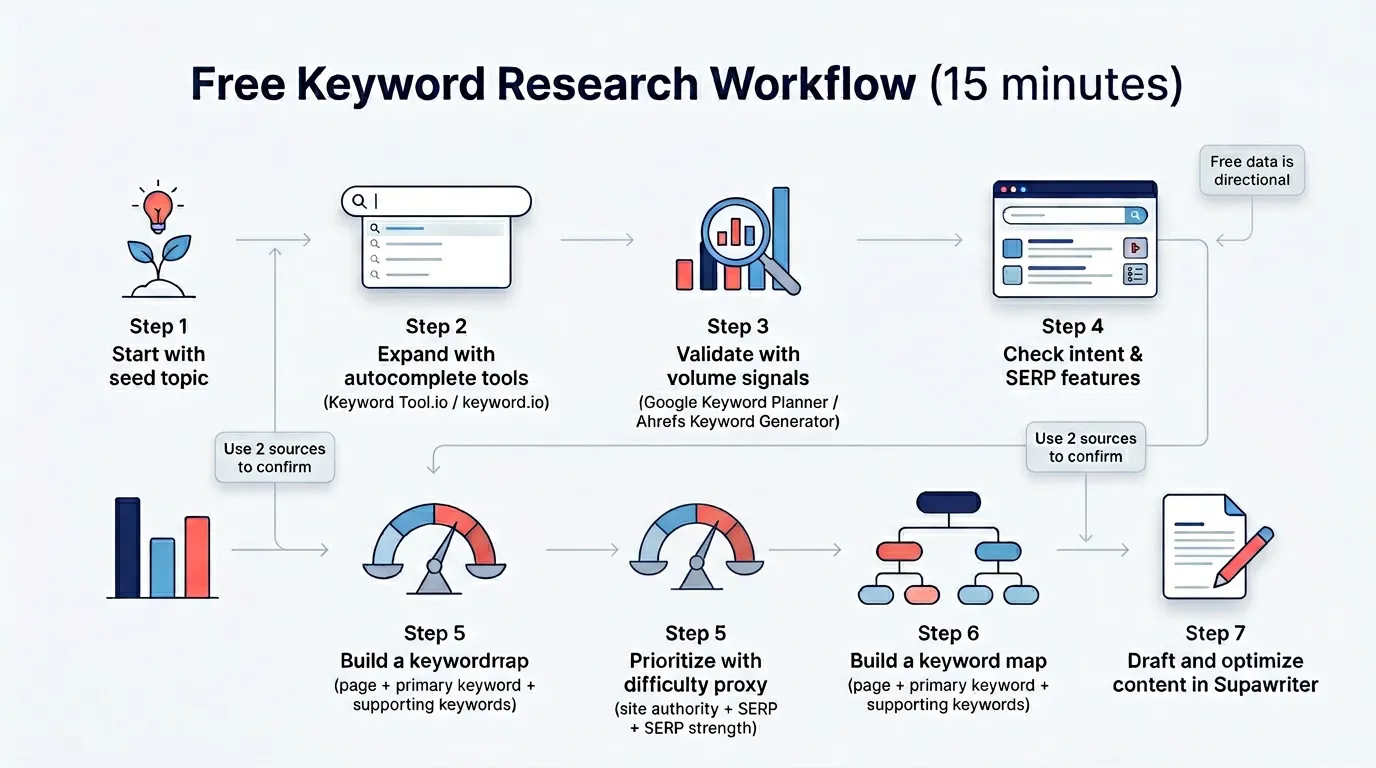
Step 1: Collect keyword ideas from autocomplete and questions
Start with a seed topic and expand it into the phrasing people actually use:
- Use autocomplete-based tools to generate long-tail keywords.
- Look for question modifiers like “how,” “best,” “vs,” “for,” “near me,” “template,” and “examples.”
- Save everything into one list, even if it’s messy.
At this stage, aim for breadth, not perfection.
Step 2: Validate with volume signals and competition proxies
Now take your best candidates and sanity-check them:
- Check search volume signals and CPC/competition in a planner-style tool.
- Cross-check with a second source, even if both are imperfect.
- Manually scan the SERP: are results blog posts, landing pages, tools, or videos?
If the top results don’t match the content you plan to publish, the intent is off even if the volume looks good.
Step 3: Build a keyword map for one page
For each page you plan to write, create a simple keyword map:
- Primary keyword: the main query you’re targeting.
- Supporting keywords: close variants and subtopics you can cover naturally.
- Section intents: what the reader wants at each stage (definition, comparison, steps, tools, examples).
This pairs well with a competitive process like keyword competitive analysis so you don’t pick keywords your site can’t realistically win yet.
Best free keyword research tools in 2026
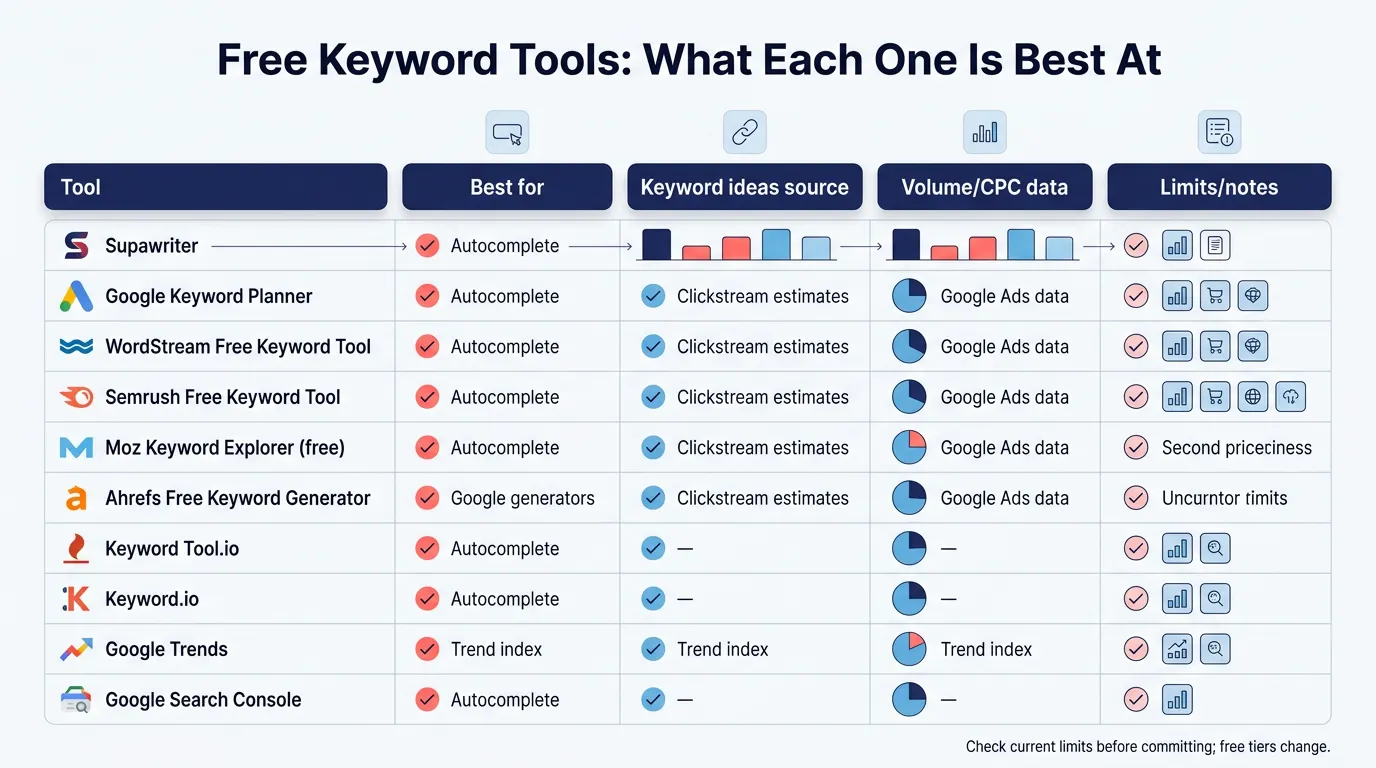
Before the full list, here’s a quick comparison you can use to shortlist.
| Tool | Best for | Keyword ideas source | Volume/CPC signals | Notes |
|---|---|---|---|---|
| Supawriter | Turning keyword research into publishable SEO content | SERP analysis + content suggestions | Uses research + workflow signals | Built for production, not just lists |
| Google Keyword Planner | PPC-first volume and forecasting | Google Ads ecosystem | Strong (especially for advertisers) | Requires account setup (WordStream overview) |
| WordStream Free Keyword Tool | Fast keyword suggestions with basic metrics | Aggregated keyword database | Volume + competition + CPC | Built for SEO and PPC workflows (WordStream tool) |
| Semrush free tools | Broad keyword discovery | Keyword Magic database | Volume, intent, KD (limited free) | Free access is capped, check limits (Semrush free keyword tool) |
| Keyword Tool.io | Long-tail expansion | Google Autocomplete | Limited in free mode | Good for idea generation |
| Google Trends | Trend direction and seasonality | Google Trends index | Trend index (not volume) | Useful for timing topics |
| Google Search Console | Your real query data | First-party query logs | Impressions/clicks/position | Best for quick wins on existing pages |
Supawriter
Supawriter is an AI-powered content engine that helps you go from keyword research to a published, optimized article without stitching together five different tools.
Key features include content suggestions for finding topics and keywords, SEO support (meta tags, on-page structure, internal linking), scheduling with a content calendar, research and fact verification, plus CMS and publishing workflows.
Pros
- Best when your problem is execution, turning a keyword list into pages you can actually ship.
- Helps you systematize internal linking (pair with your on-page SEO checklist).
Cons
- If you only need a one-off list of keywords, a simple generator may be enough.
Best for
SaaS founders and marketing teams who want to scale SEO output, not just brainstorm.
Pricing
Supawriter is a paid product, but it replaces multiple steps in the workflow (research, writing, optimization, publishing). If you’re trying to keep tooling free, you can still use free sources for discovery and then use Supawriter to produce content faster.
Google Keyword Planner
Google Keyword Planner is a common starting point for search demand, especially if you care about PPC.
Key features
- Keyword discovery and keyword list building
- Forecasting and planning for paid campaigns
Pros
- Strong for advertiser-focused keyword planning and budget forecasting (WordStream overview)
Cons
- Can be awkward for pure SEO workflows
- Often provides ranges or aggregated volume behavior depending on account context
Best for
PPC teams and anyone validating commercial intent.
Pricing
Free with a Google Ads account (cost only if you run ads).
WordStream Free Keyword Tool
WordStream’s Free Keyword Tool is built to quickly surface keywords with supporting metrics.
Key features
- Keyword suggestions
- Metrics like search volume, competition, and CPC (WordStream keyword search tool)
Pros
- Fast for brainstorming and light prioritization
- Helpful for both SEO and PPC framing (WordStream tool)
Cons
- You’ll still want a second source to confirm priorities
Best for
Marketers who want quick lists with basic metrics.
Pricing
Free tool access (with typical usage constraints).
Semrush free keyword tools
Semrush offers free keyword tooling powered by its Keyword Magic Tool database.
Key features
- Keyword ideas clustered by topic
- Metrics such as volume, intent, keyword difficulty, and CPC (depending on access) (Semrush free keyword tool)
Pros
- Good for expanding from one keyword into many related keywords
Cons
- Free access is limited and can vary, confirm current caps before building your process around it (Pagecloud Answers PDF export)
Best for
SEOs who want structured keyword expansion and grouping.
Pricing
Freemium with paid upgrades.
Moz Keyword Explorer (free access)
Moz’s Keyword Explorer is widely used for keyword research and prioritization.
Key features
- Keyword suggestions and SERP-based analysis
- Workflow features in the broader Moz ecosystem
Pros
- Solid for prioritization and SERP evaluation
Cons
- Free access is limited compared to paid plans
Best for
SEOs who want a familiar UI and prioritization workflow.
Pricing
Limited free access, paid Moz plans unlock higher usage.
Ahrefs free keyword generator
Ahrefs provides a free keyword generator that’s useful for quick expansion and basic validation.
Key features
- Keyword ideas
- Basic difficulty and volume-style signals (limited in free mode)
Pros
- Good for quick ideation without a lot of setup
Cons
- Not a full replacement for a research suite
Best for
Quick checks and early-stage content ideation.
Pricing
Free tool, deeper features are paid.
Keyword Tool.io
Keyword Tool.io is popular because autocomplete expansion is still one of the fastest ways to find long-tail keywords people actually type.
Key features
- Autocomplete keyword expansion (Google and other platforms)
Pros
- Excellent for finding modifiers and long-tail patterns
Cons
- Many metrics are behind paid plans
Best for
Idea generation when you need lots of variants fast.
Pricing
Free tier for suggestions, paid tiers for more metrics.
Keyword.io
Keyword.io is another long-tail keyword expansion tool.
Key features
- Related keyword and long-tail suggestions
Pros
- Simple, fast, and focused on idea generation
Cons
- You’ll need another tool for validation and prioritization
Best for
Writers and content strategists building outlines and subtopics.
Pricing
Free access with typical feature limits.
Google Trends
Google Trends helps answer a different question: is this keyword growing, seasonal, or fading?
Key features
- Trend lines over time
- Regional interest comparison
Pros
- Good for timing content and spotting seasonality
Cons
- Trends are not absolute search volume numbers
Best for
Editorial planning and deciding when to publish.
Pricing
Free.
Google Search Console
Google Search Console is one of the most useful free keyword research tools because it shows the queries you already appear for.
Key features
- Performance reporting: queries, clicks, impressions, CTR, average position
Pros
- Best source for “quick win” keywords to improve existing pages
Cons
- Not designed for discovering totally new topics from scratch
Best for
Growing organic traffic by upgrading pages you already have. Pair this with a publishing plan like how to build a content calendar.
Pricing
Free.
AlsoAsked (limited free)
AlsoAsked focuses on “People Also Ask” style question discovery.
Key features
- Question clusters you can use to structure an article
Pros
- Great for shaping H2s and H3s around real questions
Cons
- Limited free usage
Best for
Building outlines and FAQ coverage.
Pricing
Limited free, paid tiers for more.
AnswerThePublic (limited free)
AnswerThePublic is another tool for question-based keyword expansion.
Key features
- Question and preposition-based keyword patterns
Pros
- Strong for finding content angles and long-tail questions
Cons
- Free usage is limited
Best for
Top-of-funnel SEO content planning.
Pricing
Limited free with paid options.
How to choose the best free keyword research tool for your use case
If you’re doing SEO content planning
A practical combo looks like this:
- An autocomplete tool (Keyword Tool.io or Keyword.io) for ideas
- One validation tool (Keyword Planner, WordStream, or a limited Semrush/Ahrefs check)
- Search Console for quick wins on existing pages
Then turn the prioritized keywords into a repeatable publishing system. If you’re scaling output, Supawriter plus a clear plan like how to build a content strategy keeps quality and velocity in check.
If you’re doing PPC or paid search
Start with Google Keyword Planner because it’s made for paid planning and forecasting. WordStream can help with fast lists and grouping.
If you need YouTube or marketplace keywords
Use tools that explicitly support different engines (some keyword generators cover YouTube, Amazon, and Bing). If your channel mix matters, think about how people discover content across platforms, not just Google. For broader research, see search engines other than Google.
Common mistakes with free keyword tools (and how to avoid them)
Chasing one high-volume keyword
Head terms look tempting, but they’re often vague and competitive. Instead, build clusters: one primary keyword plus supporting keywords that show topical coverage.
Ignoring intent and SERP features
If the SERP is full of “free tool” landing pages, your blog post may struggle. Match intent first, then optimize.
Treating estimated volume as exact truth
Free tools are best for prioritization, not precision. Cross-check volume signals, scan the SERP, and then measure performance after publishing.
When you’re ready to turn keyword research into real traffic growth, Supawriter helps you connect the steps: pick a target keyword, generate a draft aligned to intent, tighten on-page SEO, and publish on a schedule so the results build over time.
Grow your traffic on autopilot now
Join thousands of users already using our platform.