AI Blog Post Generator: Free Tools and Best Options (2026)
supawriter

A blog post generator can take you from a blank page to a publishable draft fast, but the real win is consistency, clearer structure, better on-page SEO, and a workflow your team can repeat. That becomes much easier with Supawriter: you can generate long-form posts, keep your brand voice consistent, and move from draft to scheduled publishing without stitching together five different tools.
What a blog post generator is (and what it is not)
A blog post generator is a tool (often AI-powered) that creates a blog post draft from a short input like a topic, a target keyword, or a few bullet points. Most generators can also propose headlines, outline sections, and format content into a readable structure.
What it is not: a replacement for your judgment, your product expertise, or original reporting. Even the best generator still needs your edit for accuracy, positioning, and, does this actually sound like us?
Blog post generator vs. blog topic generator
You will see two closely related categories in search results:
- Blog topic generators focus on ideas: they output titles, angles, and talking points.
- Blog post generators aim to output full drafts: H2/H3 structure, paragraphs, sometimes metadata.
In practice, many tools do both, but they are optimized differently. Topic tools help when you are stuck. Full-post tools matter when you already have a keyword and want speed.
What "SEO-friendly" usually means in these tools
When a tool claims "SEO-friendly," it usually means it can help you:
- Produce scannable structure (headings, short paragraphs)
- Place keywords more naturally (without stuffing)
- Suggest metadata like title tags and meta descriptions
- Encourage internal links and relevant subtopics
For example, several popular generators position themselves around helping you publish SEO-focused posts quickly, not just general-purpose writing.
When you should not use a generator
Skip, or heavily constrain, a generator when:
- You are writing medical, legal, or financial advice (high-stakes accuracy)
- You need original reporting (quotes, experiments, primary data)
- Your content depends on fresh, time-sensitive facts and you cannot verify sources
- You publish under strict compliance rules and the tool cannot support approvals
In these cases, use AI to help with outlining and editing, but keep research and claims under tight human control.
How a blog post generator works (and where humans still matter)
Most generators follow the same pattern: you provide inputs, the model drafts sections, then you refine for accuracy, voice, and SEO.
Inputs that change output quality the most
If you want a better draft on the first try, do not just enter a vague topic. Give the tool:
- Audience + intent: "B2B SaaS marketers evaluating tools"
- Primary keyword + 3 to 5 related terms
- Angle: "workflow-first evaluation" vs. "free tool roundup"
- Proof points: your own product screenshots, results, mini case studies
- Constraints: reading level, tone, word count range, "avoid hype claims"
This is where platforms like Supawriter stand out for real teams: the value is not only drafting text, it is getting output that matches your brand voice and your SEO process.
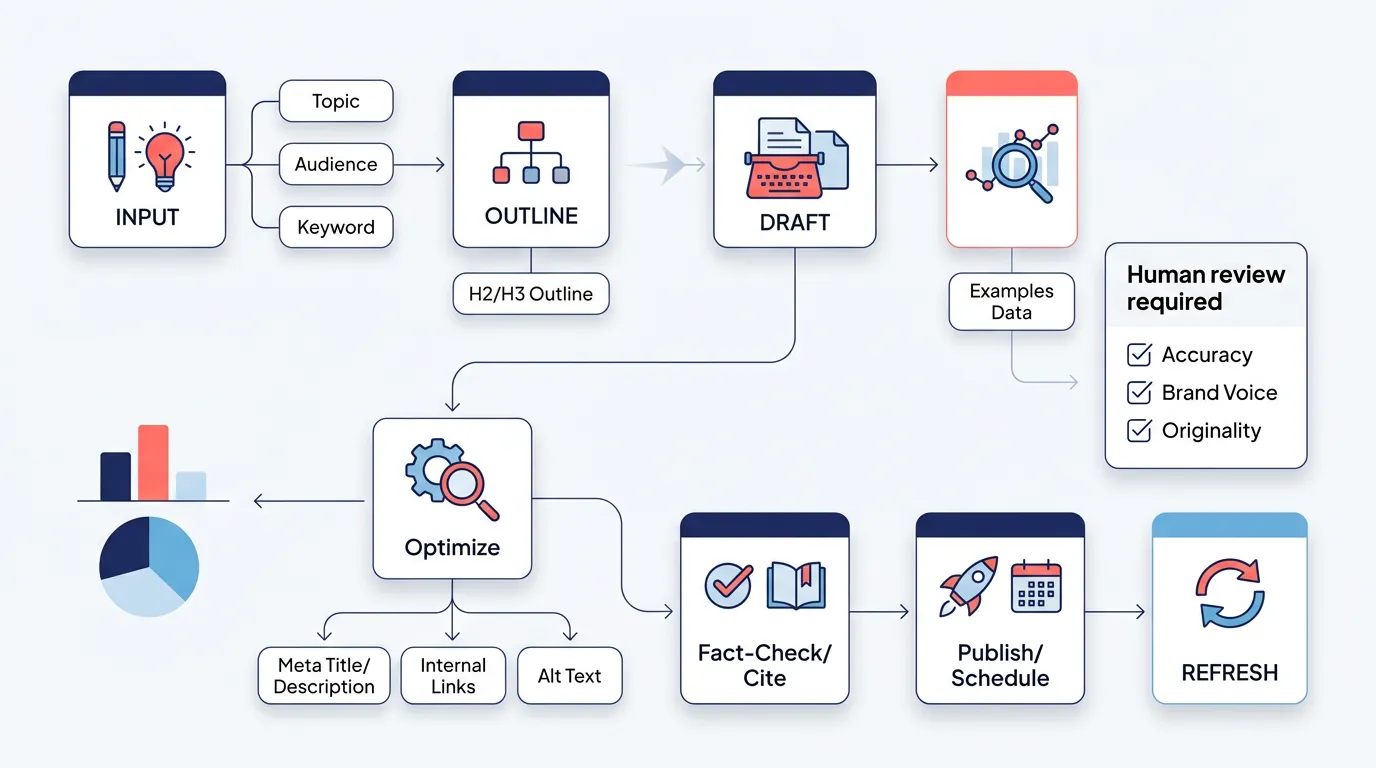
A 30 to 60 minute workflow you can repeat
Here is a simple workflow that works whether you are a solo founder or a content team:
- Pick one keyword and one intent. (Do not mash three posts into one.)
- Generate 3 outlines. Choose the one that matches the SERP pattern.
- Draft section by section. Add your examples and product context as you go.
- Add on-page SEO basics. Title, meta description, headings, image alt text.
- Add internal links. Use 3 to 5 relevant links to related posts.
- Fact-check and cite. Verify claims, remove anything you cannot support.
- Publish and schedule a refresh. Revisit in 60 to 90 days.
If you need more structure around steps 4 to 6, these guides help:
- SEO content basics and how to create it
- On-page SEO checklist for consistent optimization
- How to build a content strategy that compounds
Quality checklist before you hit publish
Before publishing any AI-assisted blog post, run this quick checklist:
- Accuracy: Are claims verifiable? Are dates and "latest" statements correct?
- Originality: Do you add unique examples, opinions, or process?
- Voice: Does it sound like your company, not generic copy?
- SEO: Does each H2 answer a real sub-question? Are internal links relevant?
- UX: Short paragraphs, clear steps, tables where comparisons matter.
Blog post generator tools people recommend for 2026 (use cases vary)
People often search for the "best" blog post generator for 2026, but the lists do not match across sources because they weigh different things, like editing quality, speed, SEO features, or integrations. According to AIOSEO's roundup of AI blog post generators for 2026 and eesel AI's 2026 review of AI blog writer tools, what counts as "best" depends on your workflow and what you publish.
Below are common options people compare when searching for a blog post generator, plus what each is best for. Some lean toward full drafts, others toward ideas, and a few support an end-to-end workflow.
Supawriter
Supawriter is a good fit when you want more than a draft and you care about repeatability: generating long-form posts, keeping brand voice consistent, and moving content through a publish-ready workflow.
Key features (workflow-first):
- Long-form AI writing that can match a defined brand voice
- SEO optimization (keyword targeting, meta tags, internal linking support)
- Scheduling and content calendar guidance for consistent publishing
- SERP analysis and research support to speed up verification
- Visuals and AI image creation for on-brand images
- CMS and publishing workflow support, deployable to any website
Pros: strong for teams that care about repeatable quality, not just speed.
Cons: if you only want a one-off free draft, a lightweight tool may feel simpler.
Best for: SaaS founders and growth teams that need consistent SEO content output and a reliable workflow.
Pricing: varies by plan; typically positioned as a paid platform rather than a single free generator.
Grammarly
Grammarly positions its blog post generator around turning a prompt into a draft, then refining tone and clarity through editing. It fits well when your bottleneck is rewriting and polishing rather than building an SEO workflow.
Key features:
- Draft generation from a prompt
- Tone and clarity improvements
- Helpful for tightening paragraphs and removing awkward phrasing
Pros: excellent for editing assistance and readability.
Cons: less of an SEO workflow unless paired with other SEO tools.
Best for: individuals and teams that already have topics but want cleaner writing fast.
Pricing: typically a free tier plus paid plans depending on features.
QuillBot
QuillBot's AI blog post generator focuses on getting to a draft quickly.
Key features:
- Draft generation from a topic
- Helpful for quick iterations on angles and structure
Pros: fast drafting for simple posts.
Cons: you will still need a process for fact-checking, internal links, and publishing.
Best for: quick first drafts when you already know what you want to say.
Pricing: commonly a mix of free access and paid upgrades.
HubSpot
HubSpot is widely used for topic and idea generation. If your biggest struggle is filling an editorial pipeline, idea tools help you get unstuck and explore variations around a theme.
Key features:
- Blog idea generation from a few keywords
- Helpful for brainstorming angles and titles
Pros: strong for ideation and marketing-led topic discovery.
Cons: idea generation is only step one; you still need drafting, optimization, and reviews.
Best for: marketing teams building or refreshing a content calendar.
Pricing: tool access varies; HubSpot products are typically tiered.
Canva
Canva's blog topic generator angle is useful when your workflow is visual, or when you want quick topic starters you can turn into social and design assets. It is less about SEO drafting and more about planning.
Key features:
- Topic/title suggestions with talking points
- Easy pairing with design workflows
Pros: good for creators who publish across blog and social.
Cons: you will likely need a separate writing and SEO setup.
Best for: small teams that want topic ideas plus a design environment.
Pricing: typically a free tier plus paid plans.
Byword
Byword is often mentioned for generating full posts quickly and for high output volume. This can work for programmatic-style content, but it also means you need strict templates, QA, and refresh cycles to avoid thin or repetitive posts.
Key features:
- Rapid full-post generation
- Designed for producing content at scale
Pros: speed and throughput.
Cons: needs a strict review process to maintain accuracy and differentiation.
Best for: teams with strong editorial operations and clear content templates.
Pricing: varies by plan.
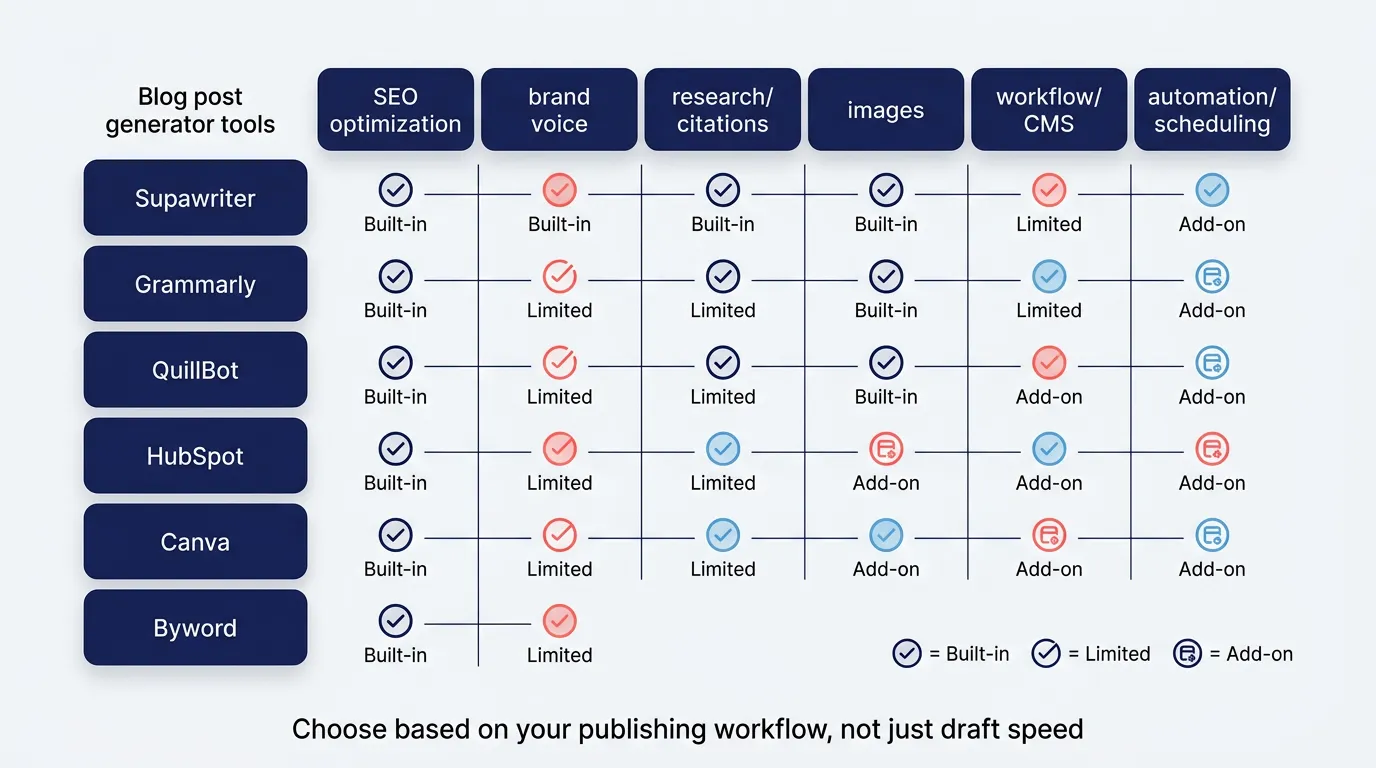
Quick comparison table
| Tool | SEO optimization | Brand voice control | Research and citations | Images | Workflow and CMS | Automation and scheduling |
|---|---|---|---|---|---|---|
| Supawriter | Built-in | Strong | Strong | Built-in | Built-in | Built-in |
| Grammarly | Limited | Medium | Limited | Limited | Limited | Limited |
| QuillBot | Limited | Medium | Limited | Limited | Limited | Limited |
| HubSpot | Limited | Limited | Limited | Limited | Medium | Medium |
| Canva | Limited | Limited | Limited | Built-in | Limited | Limited |
| Byword | Medium | Limited | Limited | Limited | Limited | Medium |
How to choose the best blog post generator for your team
The best blog post generator is the one that matches your publishing reality: who reviews content, how often you publish, and how much SEO hygiene you need per post.
If you care most about rankings and consistency
Choose a generator that supports:
- Keyword targeting across the outline (not just sprinkled into paragraphs)
- Metadata creation (titles, descriptions)
- Internal linking suggestions and easy insertion
- A repeatable on-page checklist
If you are scaling SEO content, it also helps to understand what your competitors publish and where gaps exist. Pair your generator workflow with a lightweight competitive process like this: keyword competitive analysis step by step.
If you care most about brand voice and approvals
A draft is not the hard part. The hard part is producing content that:
- Sounds like the same company every time
- Does not introduce risky claims
- Moves smoothly through reviews
That is why integrated workflows matter. A platform approach, where writing, SEO, and publishing live together, cuts down on copy-paste handoffs that usually break brand voice.
If you need images, scheduling, and publishing
If your team publishes weekly (or more), prioritize:
- Built-in scheduling and a content calendar
- Visual generation or at least image workflow support
- Publishing integration so drafts do not die in documents
For planning cadence and ownership, use a calendar process like: how to build a content calendar. If you are thinking bigger, this pairs well with operational guidance on automating SEO workflows.
Prompts and templates you can copy
Use these prompts in any blog post generator. They are designed to produce drafts that are easier to edit, verify, and optimize.
Full blog post prompt (SEO-first)
Write a blog post for: {audience}
Primary keyword: {primary keyword}
Secondary keywords: {3 to 5 related terms}
Search intent: {informational or commercial}
Angle: {one clear angle}
Requirements:
- Length: 1,200 to 1,800 words
- Use H2 and H3 headings only
- Short paragraphs, second-person voice
- Include one comparison table
- Include 3 internal link suggestions with descriptive anchors
- Avoid unverified statistics or claims
- Add a meta title (50 to 70 chars) and meta description (100 to 150 chars)
Listicle prompt (comparison-first)
Create a "best {category} tools in 2026" blog post.
Category: blog post generator Audience: B2B marketing teams
For each tool, include:
- What it is
- Key features
- Pros and cons
- Best for
- Pricing approach (free tier vs paid plans, no exact numbers)
Include a comparison table and a short "how to choose" section.
Refresh and expand prompt (update an existing post)
You are updating an existing blog post.
Existing URL/topic: {paste}
Primary keyword: {keyword}
Tasks:
- Identify missing subtopics compared to current SERP
- Improve headings (H2/H3) for clarity and intent
- Add one table that improves scannability
- Suggest 3 internal links to related posts
- Flag claims that need citations and mark them clearly
If you want a generator that supports this whole loop, not just the first draft, Supawriter is built for teams that need SEO optimization, consistent brand voice, visuals, and publishing workflows in one place, so each blog post gets easier to produce and easier to maintain over time.
Grow your traffic on autopilot now
Join thousands of users already using our platform.